
Choosing a package, upgrading later and how refunds work
Cricket auction software price explained: one-time packages by number of teams, paying only the difference to upgrade, and when you get a refund.
By Shaheem M Shereef · 7 November 2026 · 4 min read
Before you choose any cricket auction software, you want to know the price and what happens if your plans change. Here is how CricBidder's pricing works: what you pay, when you pay, how to upgrade if your league grows, and when you can get a refund.
How pricing works
- You pay once per auction. There is no subscription and nothing renews.
- The price depends on the number of teams. Not on the number of players: every package allows unlimited players.
- Setting up is free. Create your tournament, teams, players and rules, and run the readiness check, without paying. You pay only to open the lobby.
- Prices include GST.
| Package | Teams | Price |
|---|---|---|
| Gully | up to 6 | ₹999 |
| Premier | up to 10 | ₹2,499 |
| Championship | up to 20 | ₹4,499 |
| Mega Auction | up to 48 | ₹7,999 |
Every package includes the same features: the auctioneer's Control Room, team owners bidding from their phones, the public live view and projector display, and results with PDF and Excel downloads. The only difference is how many teams the auction can have. The free auction game is free and needs no package.
The prices above are for India. See the pricing page for the current prices.
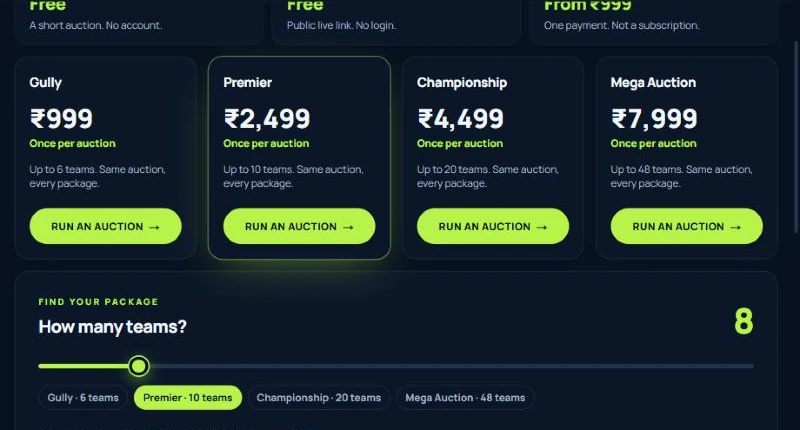
Choosing the right package
Count your teams and pick the smallest package that fits. The Payment tab marks the Best fit for your auction. Most local leagues have 8 teams, which means Premier. If your auction has more teams than its package allows, the readiness check shows it, and the lobby won't open until you upgrade.
How to pay
Open the Payment tab
In your auction, open the Payment tab. Only the tournament owner can pay.
Enter billing details
The first time, enter the details for your invoice: name, address and state. A GSTIN is optional.
Choose a package
Pick the package for your number of teams and pay securely through Razorpay.
Done
The auction is unlocked as soon as the payment is confirmed, usually within seconds. Your invoice is emailed to you and listed under Invoices on the same tab.
Upgrading later
If more teams join after you've paid, upgrade the same auction to a bigger package. You pay only the difference. For example, going from Gully (₹999) to Premier (₹2,499) costs ₹1,500. That makes it safe to start with the package you need today.
Refunds
The full terms are in our Cancellation, Refund and Delivery Policy. In short:
- Changed your mind? You get a 100% refund if you ask within 7 days of paying and the auction has not been started. Opening the lobby, editing rules or adding players doesn't count as starting; presenting the first player does.
- CricBidder failed? If a fault on our side stops your auction and we can't fix it during your event, we first offer to help you resume or reschedule on the same package. If you prefer, we refund the full amount, even if the auction had started. Tell us within 7 days of the event.
- Charged twice? We refund the extra payment in full.
- Refunds go back to the original payment method through Razorpay, normally within 5 to 7 business days.
Is there a free plan?
The free auction game is free for anyone, with no account needed. Running your own league's auction needs a package, but you can set everything up for free first.
Does the price change with the number of players?
No. Every package allows unlimited players. Only the number of teams matters.
Can I downgrade to a smaller package?
Downgrading doesn't give a partial refund, so pick the smallest package that fits and upgrade if you need to.
How do I ask for a refund?
Email support from your registered email address with the tournament and auction name, the Razorpay payment ID (it starts with "pay_") and the reason. We reply within one business day.
Run a cricket auction your whole team will remember.
Shaheem M Shereef
Founder of CricBidder. Builds cricket auction software for local leagues.