
How to run a cricket player auction for your local tournament (step by step)
How to conduct a cricket auction for your local tournament: teams, players, purse and rules, invites, and the live auction night, step by step.
By Shaheem M Shereef · 7 November 2026 · 5 min read
If you are organizing a local cricket tournament, the player auction is the night everyone remembers. This guide shows how to conduct a cricket auction from start to finish: getting your teams and players ready, setting fair rules, inviting the team owners, and running the auction itself. We use CricBidder for the examples, but the planning steps work for any auction.
Before you start: decide the basics
Agree on these with your committee first. Everything else follows from them.
- Number of teams. Most local leagues have 6 to 10 teams.
- Purse per team. The total each team can spend. Many leagues use points (for example 10,000 points) instead of real money; others use rupees in lakhs.
- Squad size. The minimum and maximum players each team must buy.
- Player categories and base prices. For example Icon, A, B and C, each with its own base price.
- Bid increments. How much each new bid adds, for example 100 points, or ₹5 lakh above ₹1 crore.
- What happens to unsold players. Do they come back for another round, and at what price?
Set up your auction step by step
Create your tournament
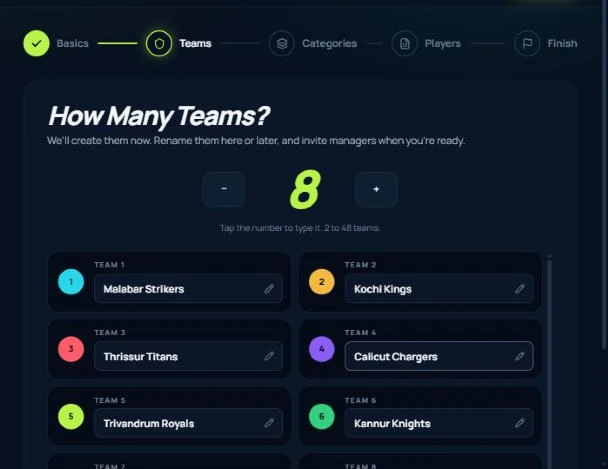
Sign up for free and choose New tournament. Enter the tournament name, season and location. Then pick how many teams you have; they are created for you, and you can rename them now or later.
Add player categories
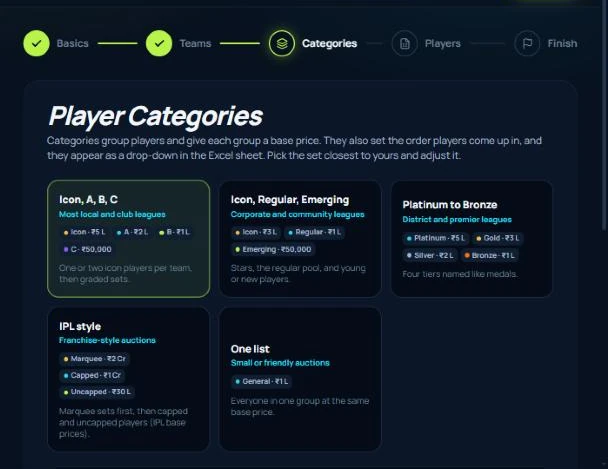
Pick the set of categories closest to yours and adjust it. Each category has a base price and sets the order players come up in.
Add your players
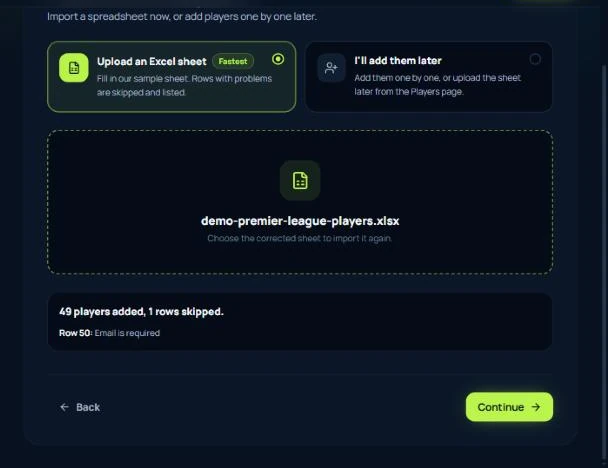
Download the sample Excel sheet, fill in each player's name, role and email, and upload it. Rows with problems are skipped and listed, so you can fix them and upload again. You can also add players one by one from the Players page.
Invite the team owners
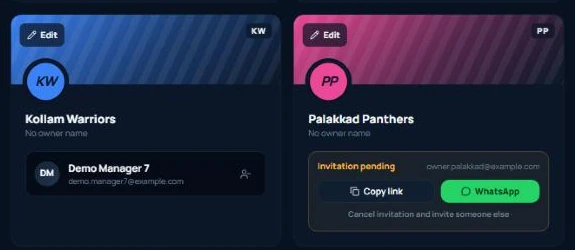
On the Teams page, choose Invite manager for each team, then Copy link or send it straight on WhatsApp. A team without a manager can still take part: the auctioneer bids for it from the floor.
Create the auction
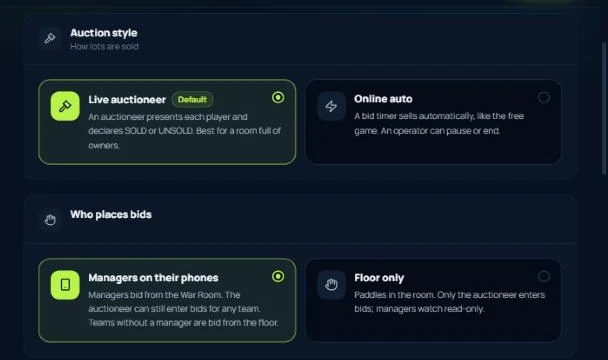
On the Auctions page, choose New auction. In Setup, pick the auction style (Live auctioneer or Online auto), who places bids (Managers on their phones or Floor only), rupees or points, and the date, time and venue.
Set the rules
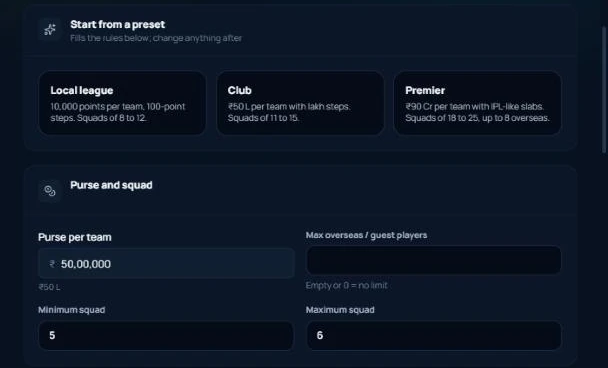
In Rules, start from a preset (Local league, Club or Premier) and change anything you need: purse per team, minimum and maximum squad, role limits, bid increments, timers and re-auction of unsold players.
Build the player pool
In Player pool, add the players who will go under the hammer in this auction.
Run the readiness check
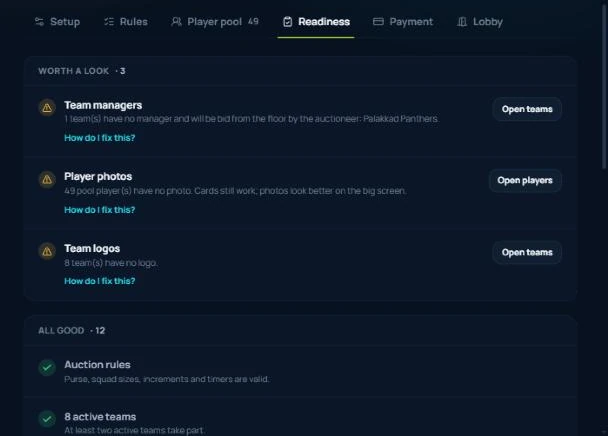
The Readiness tab lists anything that would stop the auction, such as players without a base price or a purse that cannot fill a squad. Each problem has a button that takes you to the fix.
Pay and open the lobby
Setting up is free. On the Payment tab, choose the package for your number of teams. Then, on auction night, go to Lobby and choose Open lobby.
On auction night
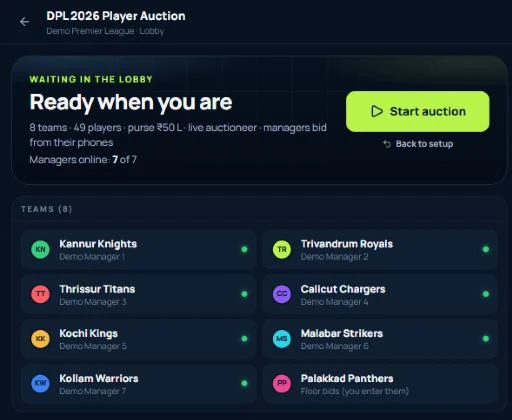
When the lobby is open, the auctioneer goes to the Control Room. It shows how many managers are online, so you can wait until every team is ready. When the room is set, the auctioneer chooses Start auction.
- Put the live view on the projector. Turn on "Let anyone watch live" in Setup, and open the live link on the hall screen. Players and fans can open the same link on their phones.
- Present each player. The auctioneer brings up the next player, the owners bid from their phones (or raise a paddle), and the auctioneer declares SOLD or UNSOLD. A short "going once, going twice" countdown can run before each SOLD.
- Fix mistakes on the spot. A wrong bid or a wrong result can be undone, and the auction can be paused for a tea break.
- Re-auction unsold players. If you turned it on in Rules, unsold players come back after the last lot for another round, at the same or a lower base price.
After the auction
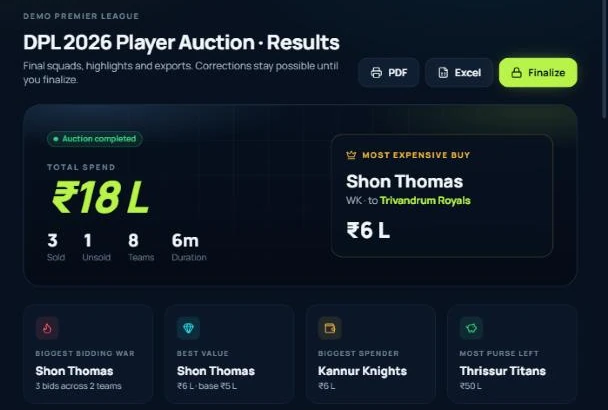
When the last player is sold, the results page shows every team's squad, what they spent and the purse left. Download the results as a PDF or an Excel file and share them in your league's WhatsApp group. When you are happy with the results, choose Finalize to lock them.
How long does a cricket player auction take?
It depends on the number of players and how hard the teams bid. A small pool with a fast auctioneer moves quickly. Plan a few minutes per player in your first auction, and use the keyboard shortcuts in the Control Room to keep the pace up.
Do we need real money for the purse?
No. Many local leagues use points. In CricBidder you choose rupees or points in the auction setup; the rules work the same either way.
Can the auction run without a live auctioneer?
Yes. Choose Online auto in Setup: a bid timer sells each player automatically, and an operator can still pause or end the auction.
What does it cost?
Setting up your tournament and auction is free. You pay once per auction to open the lobby, from ₹999 for up to 6 teams, GST included. See the pricing page.
Ready to run yours? Set it up in minutes.
Shaheem M Shereef
Founder of CricBidder. Builds cricket auction software for local leagues.