
Auction night checklist: projector, phones, Wi-Fi and the room
A practical auction night checklist: projector setup for your cricket auction, phones and Wi-Fi for team owners, and how to lay out the room.
By Shaheem M Shereef · 7 November 2026 · 5 min read
The software is only half of a good auction night. The other half is the room: a screen everyone can read, phones that stay connected, and an auctioneer who can see every team. Use this checklist for your cricket auction projector setup, the phones and the Wi-Fi, so the night runs on time and nobody argues about what they saw.
One week before
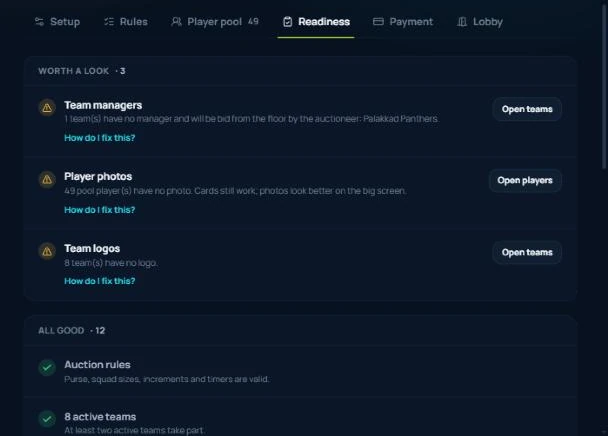
- Pass the readiness check. Open the auction's Readiness tab and fix everything that blocks the lobby. Nothing should be left for the night itself.
- Pay for the auction. Choose your package on the Payment tab, so the lobby can open.
- Every owner has accepted their invite. Check the Teams page: each team should show its manager. Remind anyone who hasn't opened their link.
- Turn on the live view. In Setup, switch on "Let anyone watch live" so players and families can follow from home.
- Do a practice run. Ask the owners to play the free auction game once, so the BID and PASS buttons are familiar.
The big screen
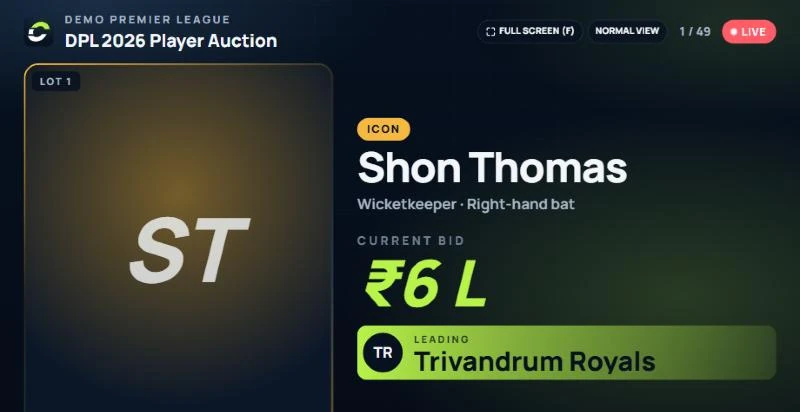
The room follows the auction on the big screen, so set it up first. CricBidder has a projector view made for it: the player on the block and the current bid in type big enough for the back row, a full-screen SOLD or UNSOLD moment for each player, and every team's purse and squad between players.
Connect a laptop
Plug a laptop into the projector or TV with HDMI, or cast to the TV. A laptop is more reliable than a phone for this.
Open the display
In the Control Room lobby, the Share panel has Open display under "For the projector". It opens the projector view in a new window.
Go full screen
Use the full-screen button in the corner of the projector view so no browser bars show.
Show the QR code
The same panel shows a QR code for the live page. Put it on screen (or print it) so the room can follow on their own phones.
Check from the back row
Walk to the back of the room and make sure you can read the player's name and the price.
Phones and Wi-Fi
Team owners bid from their phones in the War Room, so every phone needs a steady connection.
- Charge everything. Ask owners to come with charged phones, and keep a power strip and a couple of chargers near the teams' tables.
- Have a backup connection. Venue Wi-Fi often struggles when the room fills up. Mobile data is a good backup, so ask owners to keep it on. If you run a hotspot for the auctioneer's laptop, keep it for that laptop only.
- Sign in before the night. Owners should open their War Room link and sign in beforehand, not in the first five minutes.
- If a phone drops out, the War Room shows "Reconnecting…" and catches up by itself when the connection is back. If an owner can't get back in, they can bid from the floor: the auctioneer enters their bid in the Control Room.
The room
- Seat each team together at its own table, with the team name visible to the auctioneer.
- Put the auctioneer at the front, facing the teams, with the big screen behind or beside them.
- Keep one person next to the auctioneer to watch the screen and call out anything that looks wrong.
- Have paddles or name cards ready for owners bidding from the floor.
Thirty minutes before the start
Open the lobby
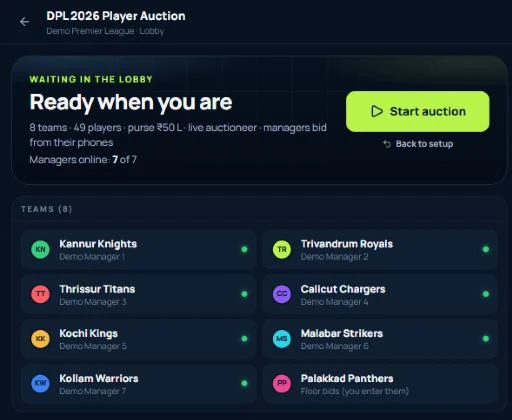
From the auction's Lobby tab, choose Open lobby, then Go to Control Room.
Count the managers
The lobby shows "Managers online" (for example 8 of 8). Wait until every team is connected, or know which teams will bid from the floor.
Test the projector
Open the display and check it from the back row.
Start
When the room is ready, the auctioneer chooses Start auction.
Do I need the public live page turned on for the projector?
No. The projector display opens from the Control Room even when the public live page is off. Turning on the live page lets people outside the room watch too.
Can I run the projector from a phone?
You can, but the projector view is designed for a big screen and looks oversized on a phone. A laptop connected to the projector or TV works best.
What if the internet goes down completely?
The auctioneer can choose Pause, and nobody can bid while the auction is paused. Bids and results already made are kept on the server, so when the connection is back you choose Resume and carry on.
Ready to run yours? Set it up in minutes.
Shaheem M Shereef
Founder of CricBidder. Builds cricket auction software for local leagues.