
Running the Control Room: shortcuts, timer, sold and unsold
The cricket auctioneer software guide: present players, take bids, run the countdown, and sell or mark unsold from the Control Room, with shortcuts.
By Shaheem M Shereef · 7 November 2026 · 5 min read
The auctioneer sets the pace of the whole night. CricBidder's Control Room is the cricket auctioneer software you run it from: one screen that shows the player on the block, every bid as it arrives, every team's purse, and the buttons to sell and move on. This guide covers the main controls and the keyboard shortcuts that keep a 100-player auction moving.
Getting in
The organizer invites you from the tournament's Members page with Invite auctioneer. Accept the invitation with the invited email, and the auction appears under Your auctions. Organizers and co-organizers can run the Control Room too: once the lobby is open, the auction's Lobby tab has Go to Control Room.
Use a laptop or a tablet. A keyboard makes the shortcuts possible, and the bigger screen lets you see every team at once.
The lobby
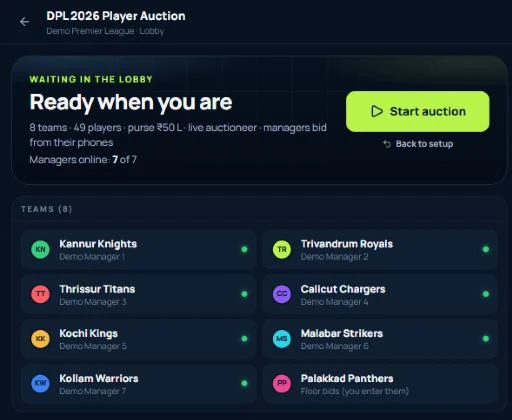
Before the start, the Control Room shows the lobby: the number of teams and players, the purse, the auction style, and Managers online (for example 7 of 8). The Share panel has the War Room link for managers, the live page link with a QR code, and Open display for the projector. When the room is ready, choose Start auction and confirm with Start now.
Running a player
Present the next player
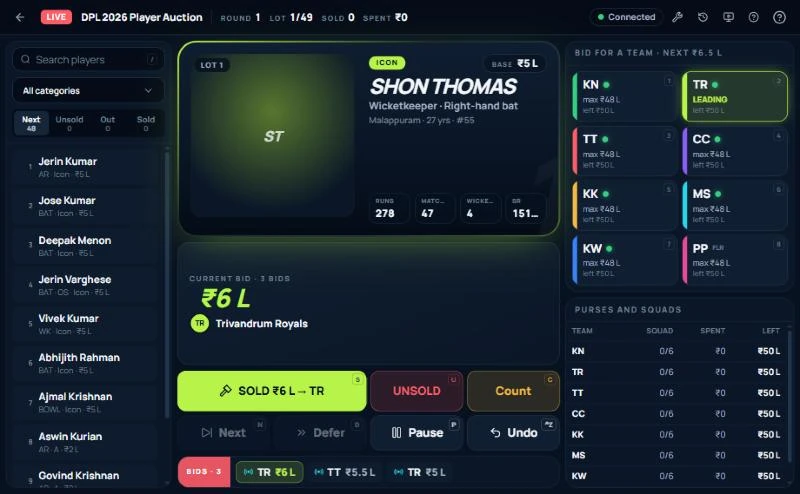
Choose Next player (or press N). You can also pick a player from the queue: press / to search, and Enter presents the first match.
Take bids
Managers' bids from their phones appear instantly. For floor bids, press 1 to 9 (and 0 for the tenth team) to bid the next minimum for that team, or Shift with the number to enter another amount. With more than ten teams, press B to bid by team code.
Run the countdown
When the bidding slows, press C to start "Going once… going twice…". Managers see it on their phones. Press C again to stop it if a new bid comes in.
Sell or mark unsold
Press S to sell to the highest bidder, or U if nobody bid. The room sees the result on the big screen straight away.
Move on
Press N for the next player.
The keyboard shortcuts
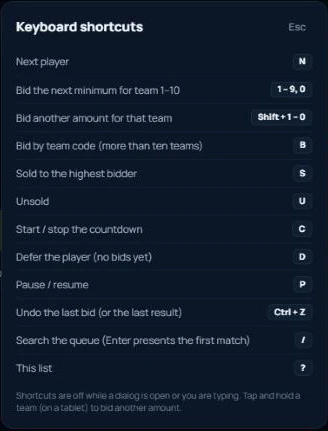
| Key | What it does |
|---|---|
| N | Next player |
| 1 – 9, 0 | Bid the next minimum for team 1–10 |
| Shift + 1 – 0 | Bid another amount for that team |
| B | Bid by team code (more than ten teams) |
| S | Sold to the highest bidder |
| U | Unsold |
| C | Start / stop the countdown |
| D | Defer the player (no bids yet) |
| P | Pause / resume |
| Ctrl + Z | Undo the last bid (or the last result) |
| / | Search the queue (Enter presents the first match) |
| ? | Show the shortcuts |
Shortcuts are off while a dialog is open or you are typing. On a tablet, tap and hold a team to bid another amount.
The countdown and the timer
In a Live auctioneer auction, you decide when a player is sold. The organizer can set a "going once, going twice" countdown of a few seconds in Setup, and choose whether it sells automatically when it ends or waits for you to confirm SOLD. If the countdown is off in setup, the button tells you so.
In an Online auto auction, a bid timer sells each player automatically when it runs out. You can still pause, correct and end the auction from the Control Room.
Pause, defer and undo
- Pause (P): nobody can bid while paused. Use it for a tea break, a question from the floor, or a connection problem. Press P again to resume.
- Defer (D): sends a player to the end of the queue before anyone has bid, for example if the player hasn't arrived yet.
- Undo (Ctrl + Z): takes back the last bid, or the last result if the player has already been sold or marked unsold. The player goes back on the block.
For bigger fixes, like voiding an earlier sale, see our article on handling disputes on auction night.
Can two people run the Control Room at the same time?
Yes. The Control Room shows the operators who are online. Agree beforehand who presses SOLD, so you don't both act on the same player.
What happens to unsold players?
If the organizer turned on re-auction, unsold players come back for another round after the last player, at the base price the organizer chose. When the queue is empty, the Control Room offers to requeue unsold players or end the auction.
Is everything recorded?
Yes. Every bid, result and correction goes into the auction's Audit log, which you can open from the Control Room.
Get booked to run auctions on CricBidder.
Shaheem M Shereef
Founder of CricBidder. Builds cricket auction software for local leagues.