
How to bid from your phone in a live cricket auction
How to bid in a cricket auction from your phone: accept your team invite, open the War Room, and use BID and PASS on auction night.
By Shaheem M Shereef · 7 November 2026 · 5 min read
If you own or manage a team in a league that runs its auction on CricBidder, you bid from your own phone. There's nothing to install. This guide explains how to bid in a cricket auction from your phone: getting into your War Room, reading the screen, and using the two buttons that matter, BID and PASS.
Before auction night: get into your War Room
Open your invitation
The organizer sends you a link, usually on WhatsApp. Open it on the phone you will bid from.
Sign in or sign up
Use the same email address the organizer invited. The invitation only works for that email.
Accept
Choose Accept and manage this team. Your team now appears under My teams.
Open the War Room
From My teams, open your team's War Room. Before the auction it shows the rules for your team, a countdown to the start, and the player pool to scout.
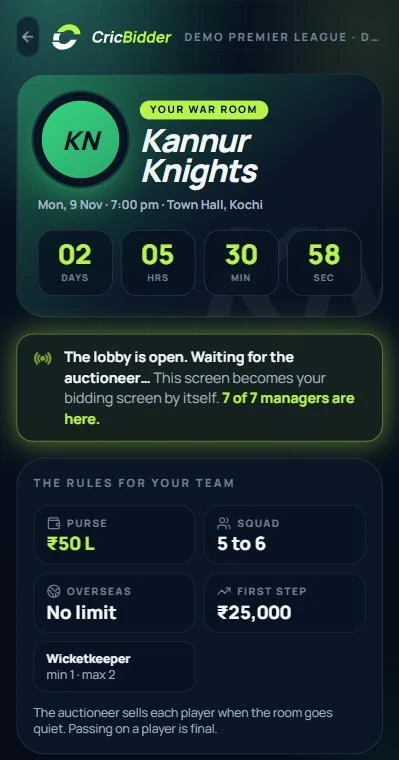
Practise first
If you have never bid in an auction app, play the free auction game once. It uses the same BID and PASS buttons and the same auction rules, against AI teams. No account is needed and it takes a few minutes.
On auction night: reading the screen
When the auction is live, your phone shows everything you need on one screen:
- The player on the block: name, role and base price.
- The current price and the leading team: who holds the bid right now.
- "Going once…" and "Going twice…" when the auctioneer starts the countdown before SOLD.
- BID and PASS, always in the same place at the bottom.
Your squad, the player pool, the other teams and the activity feed are in sheets you can open from the bottom of the screen, so you never have to leave the live bidding.
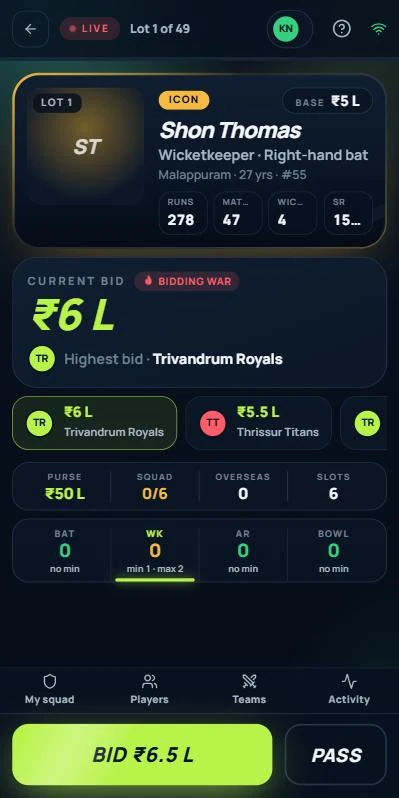
How BID and PASS work
- BID shows the exact amount it will bid, for example "BID 1,200". It is always the next minimum bid: the current price plus the bid increment. One tap places it. The button locks for a moment so a double tap can't bid twice.
- PASS means you're out for this player. Whether you can come back depends on your league's rules: if "a pass is final" is on, you can't bid on that player again.
- If someone outbids you, your phone tells you who did it and at what price.
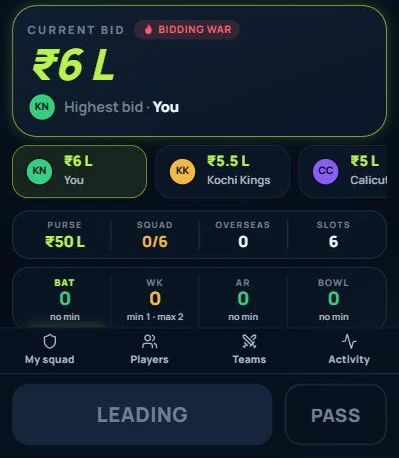
When the BID button is grey
The BID button switches off and tells you why. The common reasons:
- Leading: you already hold the highest bid.
- Not enough purse: the next bid is more than you can spend. You must keep enough to complete your minimum squad at the lowest base price.
- Squad full: you already have the maximum number of players.
- Role limit or Overseas limit: one more player of this kind would break your league's rules.
- Passed: you passed on this player and passing is final.
- Paused: the auctioneer has paused the auction. Nobody can bid until it resumes.
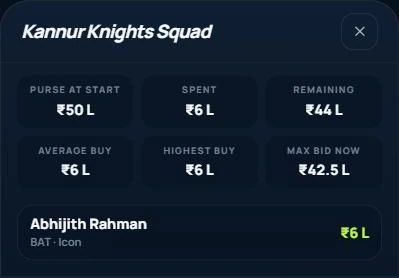
To see how much you can spend right now, open My squad: it shows your purse left and Max bid now.
If something goes wrong
- "Reconnecting…": your phone lost its connection. Move closer to the Wi-Fi or switch to mobile data. The War Room catches up by itself.
- Can't get back in: tell the auctioneer. They can enter bids for your team from the Control Room while you raise your hand or paddle.
- Your team is bid from the floor: if the organizer chose floor bidding, your War Room is read-only and the auctioneer takes your bids in the room.
Do I need to download an app?
No. The War Room runs in your phone's browser. You can add it to your home screen if you like, but you don't have to.
Can I bid a bigger amount than the next minimum?
From your phone, each tap bids the next minimum amount. If you want to jump the price, tell the auctioneer: they can enter a different amount for your team.
What happens after the auction?
Your War Room shows your final squad, what you spent and your purse left.
Can someone else bid for my team?
Only the person who accepted the team's invitation bids from the app. If someone else should hold the phone on the night, ask the organizer to invite them as the team's manager.
Try a quick auction before the real one.
Shaheem M Shereef
Founder of CricBidder. Builds cricket auction software for local leagues.