
Registering for a tournament on CricBidder
How to register as a player for a cricket tournament auction on CricBidder, what the organizer sees, and how to follow your status.
By Shaheem M Shereef · 7 November 2026 · 3 min read
Many tournaments now ask players to sign up online instead of handing in a paper form. If your tournament uses CricBidder, player registration takes a few minutes on your phone, and you can follow your status right up to the auction result. This guide covers both sides: what players do, and how organizers open the form and approve entries.
For players: how to register
Open the link
Your organizer shares a registration link, usually on WhatsApp or Instagram. You don't need an account to fill it in.
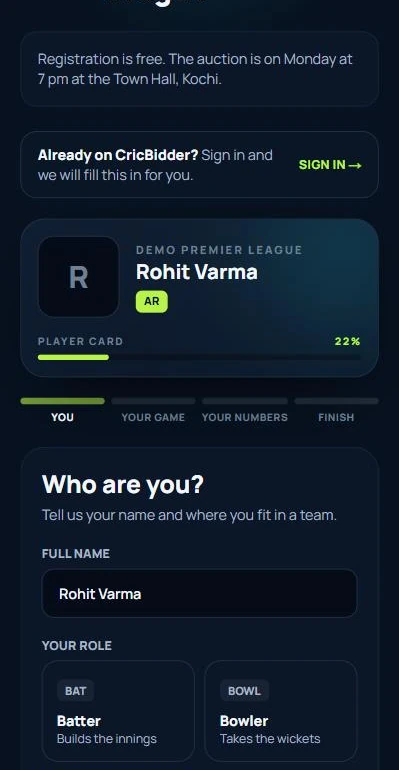
You
Your full name and your playing role: batter, bowler, all-rounder or wicketkeeper.
Your game
Your batting style and bowling style, for example right-hand bat or left-arm orthodox.
Your numbers
Optional details like your city, date of birth and matches played. They're optional, but they make your player card look sharper.
Finish
Add a photo and how the organizer can reach you: your phone number and email. Then send the form.
You'll see a thank-you screen and get a confirmation email. The organizer then reviews your entry.
After you register
Your entry goes through a few stages:
- Waiting for approval: the organizer hasn't decided yet. You can still change your details.
- Approved: you're accepted, and the organizer will add you to the auction pool.
- In the auction pool: you can come up for bidding.
- Sold or not picked: the result of the auction.
If the organizer doesn't accept your entry, you can edit your details and apply again. To follow your status, sign up or sign in to CricBidder with the same email and open My player entries. You can change your photo there any time before the auction starts.
For organizers: open the registration form
Open Player registration
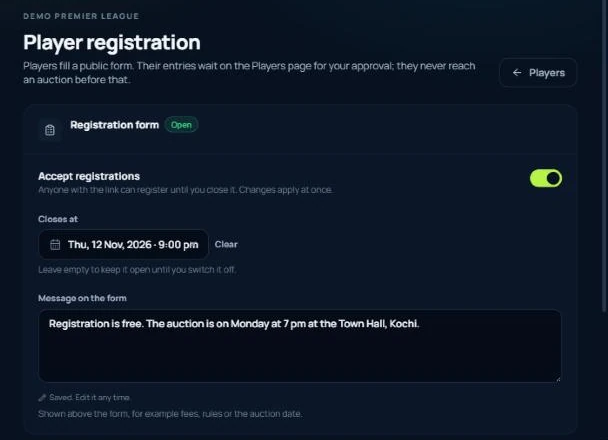
In your tournament, open the Players page and choose Registration.
Turn it on
Switch on Accept registrations. Optionally set Closes at; leave it empty to keep the form open until you switch it off.
Add a message
The Message on the form appears above the form, for example the rules or the auction date.
Share the form
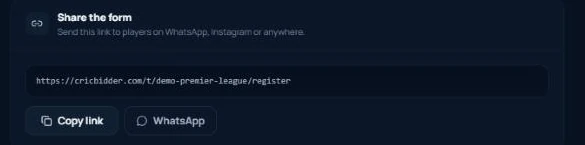
Copy the link, or use the WhatsApp button, and share it with your players.
Approve entries
New entries wait on the Players page, marked as needing approval. Approve or reject each one. Players never reach an auction pool before you approve them.
When you switch the form off, or the closing time passes, anyone who opens the link sees a notice that registration is closed. Changes to these settings apply at once, so you can reopen the form for late entries and close it again whenever you like.
Registered players join the same player list as the ones you import from Excel, so you can mix both: import the regulars, and let new players sign up themselves.
Do players need a CricBidder account to register?
No. The form works without an account. An account is only needed later, to see your player page and auction result.
Can I register for more than one tournament?
Yes. Each tournament has its own form, and all your entries show up under My player entries.
The form says registration is closed. What now?
The organizer has switched it off, or the closing time has passed. Contact the organizer directly.
Feel what a live auction is like.
Shaheem M Shereef
Founder of CricBidder. Builds cricket auction software for local leagues.