
Import your players from Excel and invite team owners on WhatsApp
Turn your cricket auction player list in Excel into a ready player pool, and invite every team owner with a WhatsApp link.
By Shaheem M Shereef · 7 November 2026 · 4 min read
Almost every league already has its cricket auction player list in Excel: names, roles, phone numbers, sometimes a category. You don't need to type it all again. This guide shows how to bring that sheet into CricBidder, fix the rows that don't fit, and then invite each team owner with a link they can open on WhatsApp.
Get your sheet ready
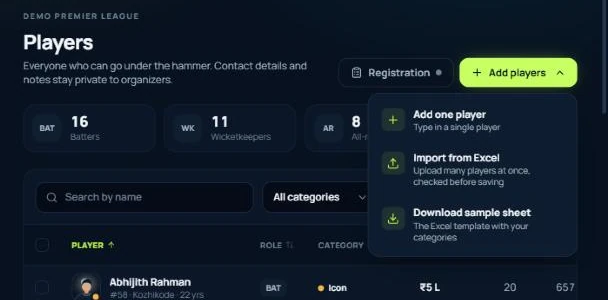
Start from our sample sheet so the columns match. On the Players page, open Add players and choose Download sample sheet. Copy your players into it. Three columns are required for every player:
- name: the player's full name.
- role: pick from the drop-down: BAT (batter), BOWL (bowler), WK (wicketkeeper) or AR (all-rounder).
- email: used to match the player, so the same person is never added twice. It is also how a player signs in later to see their own page.
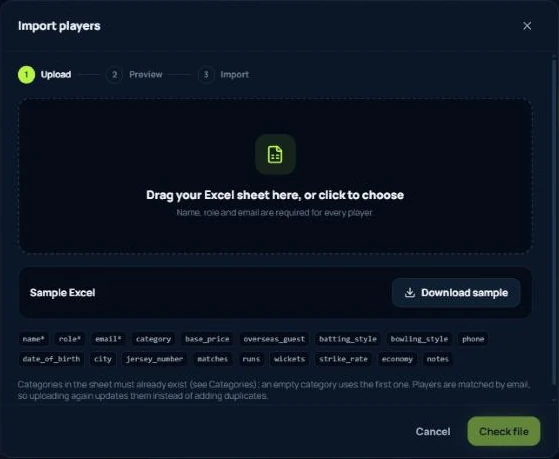
Everything else is optional: category, base_price, overseas_guest, batting_style, bowling_style, phone, date_of_birth, city, jersey_number, matches, runs, wickets, strike_rate, economy and notes. Role, category and overseas/guest are drop-downs in the sample sheet, and your own categories are already in the list.
Import the players
Open the import
On the Players page, open Add players and choose Import from Excel. You can also upload the sheet in the last step of the new tournament set-up.
Check the file
Drop your sheet in and choose Check file. Nothing is saved yet: CricBidder reads every row first.
Read the report
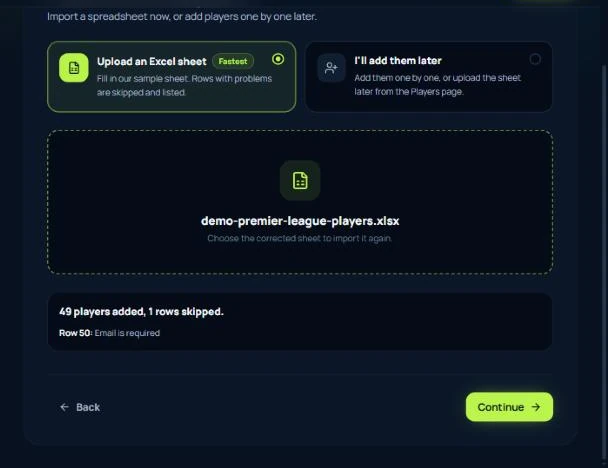
Rows with problems are skipped and listed with the reason, for example a missing email. The rest are ready.
Import
Choose the Import button (it shows how many players will be added) to add the good rows. Then fix the skipped rows in your sheet and upload it again. Players are matched by email, so the ones already imported are not duplicated.
Add stragglers by hand
For a late entry, open Add players, choose Add one player and fill in the form.
Once the players are in, add them to the auction from the auction's Player pool tab with Add players. If you'd rather have players sign up themselves, you can share a public registration form instead; their entries wait for your approval before they can join a pool.
Invite the team owners on WhatsApp
Each team needs someone to bid for it. In CricBidder that person is the team's manager: usually the owner, or someone the owner trusts with the phone on auction night.
Open the Teams page
Every team you created is listed with its manager, or "No manager yet".
Invite a manager
Choose Invite manager on a team and enter the owner's email address.
Share the link
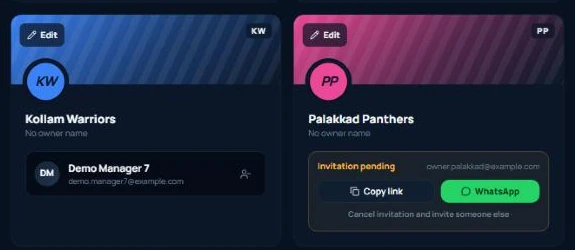
Choose Copy link, or the green WhatsApp button to send it straight to the owner or your league group. Only an account with the invited email can accept it, so it is safe to post in a group.
The owner accepts
They open the link, sign in or sign up with that email, and choose Accept and manage this team. The team then shows up under My teams, where they open their War Room.
If a link expires before the owner opens it, the team card offers This link expired: send a new one. To hand a team to someone else, cancel the invitation and invite the new person.
Teams without a manager
Not every owner will have a smartphone, and that's fine. A team without a manager is bid from the floor: the owner raises a paddle and the auctioneer enters the bid for them in the Control Room. The readiness check lists these teams as a warning, not a blocker, so you know who will be bidding from the floor.
Can I import a CSV file?
No, the import takes Excel (.xlsx) files. Open your CSV in Excel or Google Sheets and save it as .xlsx first.
What if two players have the same name?
That's fine as long as their emails are different. The readiness check warns you about possible duplicates so you can double-check them.
Do players need a photo?
No. Photos make the live screen look better, and the readiness check lists players without one as a warning, but an auction can run without them.
Ready to run yours? Set it up in minutes.
Shaheem M Shereef
Founder of CricBidder. Builds cricket auction software for local leagues.