
Watch your auction live and see which team picked you
Watch your cricket auction live from your phone, no login needed, and see which team picked you and how the bidding on you went.
By Shaheem M Shereef · 7 November 2026 · 4 min read
For a player, auction night is nervous: will a team pick you, and for how much? If your league runs its auction on CricBidder, you don't have to be in the hall to find out. You can watch the cricket auction live on your phone, and afterwards see exactly which team picked you and how the bidding went.
Watch live, no login needed
When the organizer turns on the public live view, the auction gets its own live link. Anyone with the link can watch: no account, no app. On the live page you see:
- the player on the block and their base price,
- every new bid and the team that leads,
- each SOLD or UNSOLD as it happens, with the price and the team,
- the next player coming up, and each team's purse left.
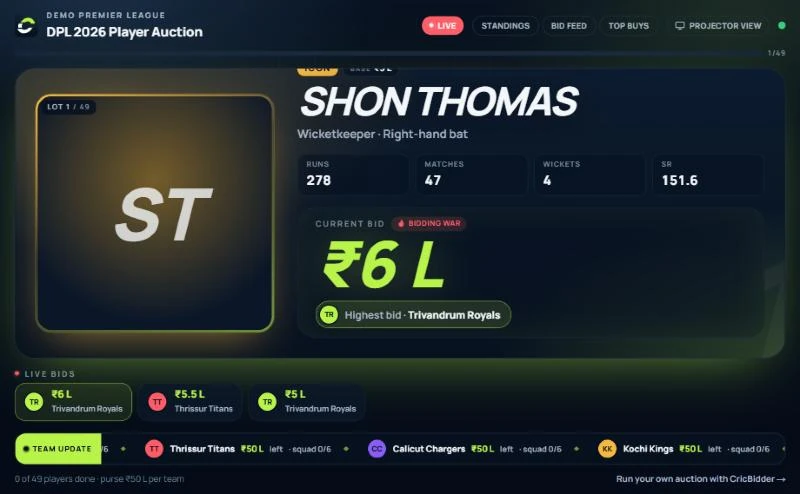
Ask your organizer for the link. They can share it on WhatsApp, and in the hall it is usually on the big screen as a QR code you can scan. Some organizers also list their auction on the CricBidder website, so it shows up on the live auctions page.
After the auction: the results
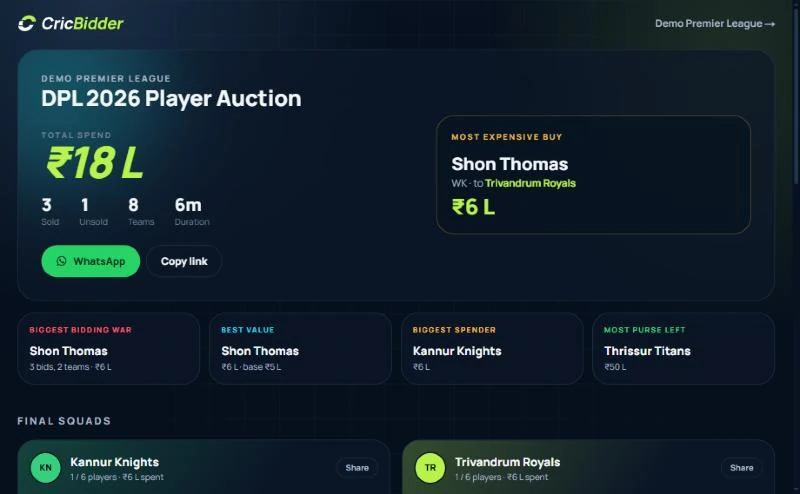
When the auction is over, the same link shows the results: every team's final squad, the most expensive buys and the totals each team spent. Share it with your family and friends.
Your own player page
If you registered through your tournament's registration form, or the organizer added you with your email, you also get your own player page in the CricBidder app.
Sign in with your email
Sign up or sign in with the same email you registered with, and verify it. Your entries are matched by your verified email address.
Open My player entries
It lists every tournament you are in, with your status: waiting for approval, approved, in the auction pool, sold, or not picked.
Watch from there
While the auction is on, your entry has a link to watch the auction live.
See your journey
When you have been sold, open your journey: your starting price, your final price, the team you were sold to, every bid on you and how many teams wanted you.
Your journey also shows how you compare: your price rank in the auction, the average price, and the most expensive buys in your new squad.
If you were not picked
It happens to good players in every auction. Your page tells you honestly, and sometimes it adds that teams were interested but nobody closed the deal. If your league re-auctions unsold players, you may still come up again later in the same auction, often at a lower base price.
Do I need an account to watch?
No. The live page works without logging in. You only need an account to see your own player page.
The live link says nothing is on air. Why?
The auction hasn't started yet, or the organizer hasn't turned on the public live view. The page goes live by itself when the auction begins.
Can I change my photo before the auction?
Yes. From your player page you can change your photo any time before the auction starts, even after the organizer has approved your entry.
Can I try bidding myself?
Yes. Play the free auction game and see the auction from a team owner's side. No account is needed.
Feel what a live auction is like.
Shaheem M Shereef
Founder of CricBidder. Builds cricket auction software for local leagues.