
Purse, base price and bid increments: how to set fair cricket auction rules
How to set cricket auction rules that feel fair: purse per team, base prices, bid increments, squad size, role limits and re-auction.
By Shaheem M Shereef · 7 November 2026 · 6 min read
Most arguments on auction night start with the rules: a team that spent everything on two stars, a bid that jumped too fast, or a squad that cannot be filled. This guide explains the cricket auction rules every organizer has to decide, the purse and the base price first, and how to set them so the auction stays fair and fun from the first player to the last.
Start with the purse
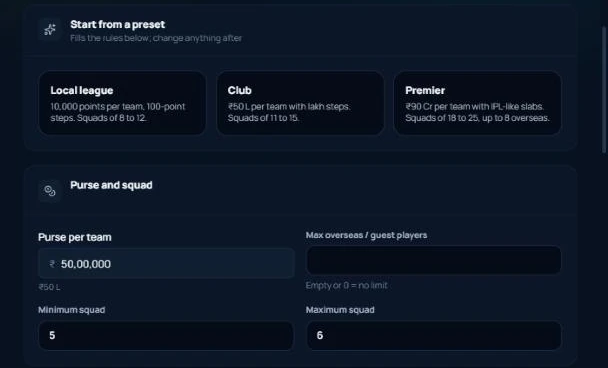
The purse is the total each team can spend. Every team gets the same purse. You can use real rupees (for example ₹50 lakh) or points (for example 10,000 points); many local leagues use points because no real money changes hands. In CricBidder you pick Rupees or Points in the auction's Setup tab. The rules work the same either way.
A simple way to size the purse: decide the average price you want for a player, and multiply it by the squad size. If squads are 12 players and an average player should cost about 800 points, a purse of 10,000 points gives room for a few big buys and a fair spread for the rest.
Base prices and player categories
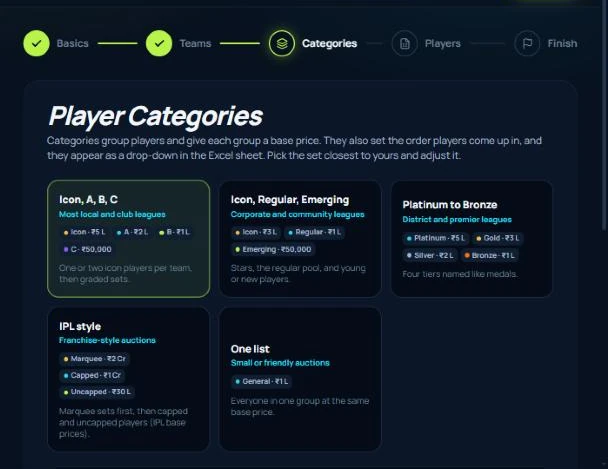
The base price is where bidding starts for a player. Most leagues group players into categories, each with its own base price, for example:
- Icon, A, B, C: one or two icon players per team, then graded sets. The most common choice for local and club leagues.
- Icon, Regular, Emerging: stars, the regular pool, and young or new players.
- Platinum to Bronze: four tiers named like medals.
- One list: everyone in one group at the same base price, for small or friendly auctions.
Categories also decide the order players come up in. In Rules, under "Order and re-auction", choose Sets in order, Sets, shuffled within or Fully random.
Bid increments: how much each bid adds
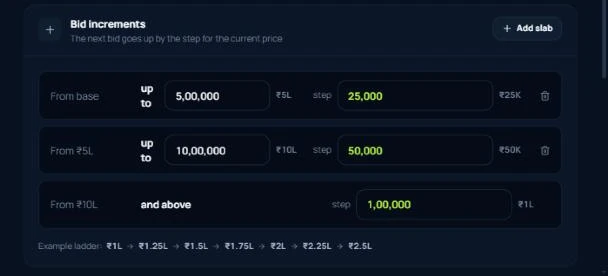
The bid increment is how much the price goes up with each new bid. A flat step (say 100 points) is easy for everyone to follow. Bigger auctions use slabs: small steps while the price is low, bigger steps once it climbs. For example, the "Club" preset in CricBidder uses ₹25,000 steps up to ₹5 lakh, ₹50,000 steps up to ₹10 lakh, and ₹1 lakh steps above that.
In the Bid increments card, add a slab for each price range and its step. The last slab has no upper limit. Under the slabs, the example ladder shows how the price will climb, so you can check it feels right before auction night.
Squad size, role limits and overseas players
- Minimum and maximum squad. Every team must buy at least the minimum, and cannot buy more than the maximum.
- Role limits. Per team, for Batter, Bowler, All-rounder and Wicketkeeper. For example, at least 1 and at most 2 wicketkeepers. Bids that would break a limit are refused.
- Max overseas / guest players. A cap on guest players per team. Leave it empty for no limit.
The rule that stops teams overspending
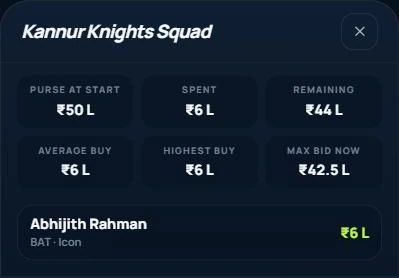
CricBidder never lets a team spend money it needs to complete its squad. A team can only bid up to its purse minus what it must keep to buy the rest of its minimum squad at the lowest base price. Team owners see this as "Max bid now" in their War Room, so nobody is surprised.
Set your rules step by step
Pick a preset
In the auction's Rules tab, choose Local league (10,000 points, 100-point steps, squads of 8 to 12), Club (₹50 lakh with lakh steps, squads of 11 to 15) or Premier (₹90 crore with IPL-like slabs, squads of 18 to 25). It fills in every rule below.
Adjust the purse and squad
Change Purse per team, Minimum squad and Maximum squad to match your league.
Set role limits
Add minimums or maximums for the roles that matter, usually wicketkeepers.
Check the increments
Edit the slabs and read the example ladder.
Decide on unsold players
Turn on Re-auction unsold players, choose 1 to 3 more rounds, and the base price for those rounds: 100%, 75% or 50%.
Run the readiness check
The Readiness tab confirms that every team can afford a minimum squad at base prices, and lists anything that doesn't add up.
What happens if the purse is too small for the squad size?
The readiness check blocks the auction and tells you how much is needed. For example, a minimum squad of 11 at a lowest base price of 500 needs a purse of at least 5,500.
Can a team pass on a player and come back later?
That depends on the rule A pass is final for the lot. When it's on, a team that passes can't bid on that player again.
Can some players join a team before the auction?
Yes. In the auction's Player pool, you can pre-assign icon, owner or retained players to a team at a fixed price. They join the team when the auction starts, and its purse and squad count update automatically.
Can I change the rules after the auction has started?
No. Setup and rules are locked once you open the lobby, so every team bids under the same rules from start to finish. If you spot a mistake while the lobby is open and the auction hasn't started, choose Back to setup, fix it, and open the lobby again.
Ready to run yours? Set it up in minutes.
Shaheem M Shereef
Founder of CricBidder. Builds cricket auction software for local leagues.